
Run a command again from the history
Mortise keeps the last 50 runs of each app. You can read each one and run its command again. You need to have chosen the PHP for the app.
Open the history
Section titled “Open the history”-
Show the runner drawer with Ctrl `, on macOS too, or with Ctrl J (Cmd J on macOS).
-
Press History on the bar of the drawer, or Ctrl Shift H (Cmd Shift H on macOS). If no command has run in the app since Mortise opened, the drawer shows the history at once.
Read a past run
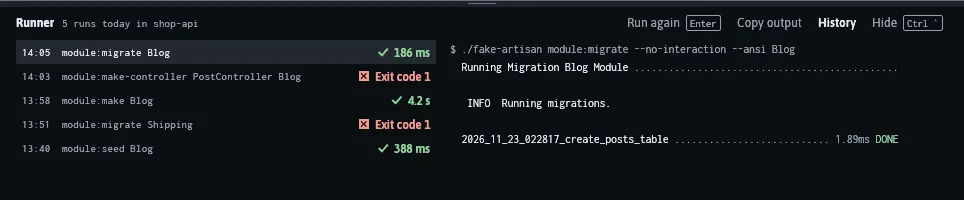
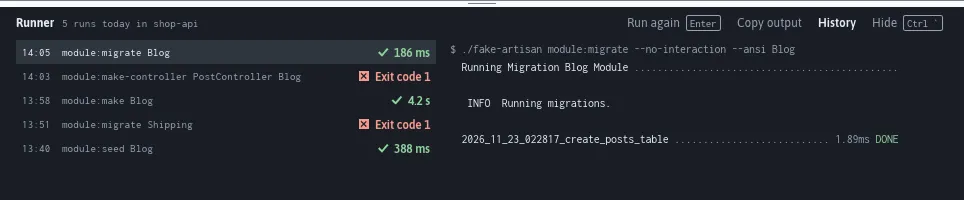
Section titled “Read a past run”The list shows the runs of the app, the latest first. Each row has its clock time, its command and its result. The bar counts the runs of the day, such as “5 runs today in shop-api”.
-
Press Up or Down, or click a row, to select the run.
-
Read its output beside the list. The
$line above the output is the line that runs again, through how PHP runs for the app now.
Run the command again
Section titled “Run the command again”-
Select the run and check the
$line. If no$line shows, Mortise has no way to run PHP for the app. Choose one in Settings first. -
Press Run again, or Enter while the list has focus.
-
If Mortise asked before the command ran last time, it asks again:
- A line with
--force, or a roll back that is not a dry run, asks “Run<command>again?”. Read it, then press Run again. Focus starts on Cancel. - Reset migrations, Refresh migrations, Drop all tables and migrate and Delete module open their full question, with the typed name where the action needs one. Continue as in Run a destructive action. A dry run of Reset migrations runs at once.
- A line with
The output of the new run replaces the history in the drawer. Press History to go back to the list.
Outside the history, Run again on the bar, or Ctrl Shift R (Cmd Shift R on macOS), runs the last command of the app again. If how PHP runs for the app changed since that run, the first press shows the history with the new line. Press again to run it.
Copy a command or its output
Section titled “Copy a command or its output”- Copy output, or Ctrl Shift O (Cmd Shift O on macOS),
copies the output of the selected run as plain text. It does not copy the
$line. - The history has no button to copy the command itself. To copy a command line, open the action or the generator and press Copy command, or Ctrl Shift C (Cmd Shift C on macOS).
Where the history lives
Section titled “Where the history lives”The history lives in the data folder of Mortise, never in the app. Each app keeps its last 50 runs, with the output of each up to 1 MB. The 51st run drops the oldest. A read that only gives data, such as the migration state, is not kept.
The folder for each platform is in Files and folders. The drawer, its states and its keys are in Runner drawer.