
Summary
The Summary tab is the first tab of the workspace (1). It has two forms: one for All modules and one for a single module. Everything on it is read from files, from git and from the coverage report, except the boxes marked “actuator”. Those need a connected environment; see Actuator endpoints.
Summary of All modules
Section titled “Summary of All modules”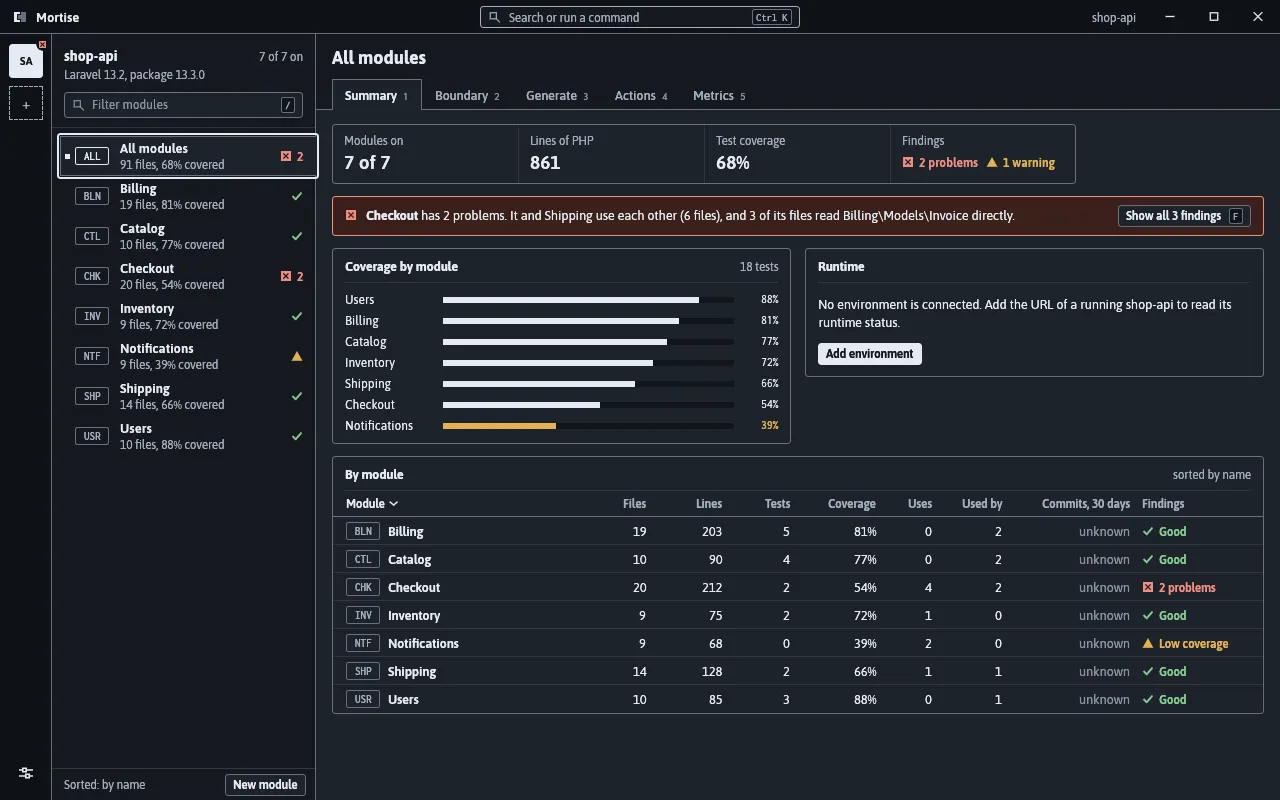
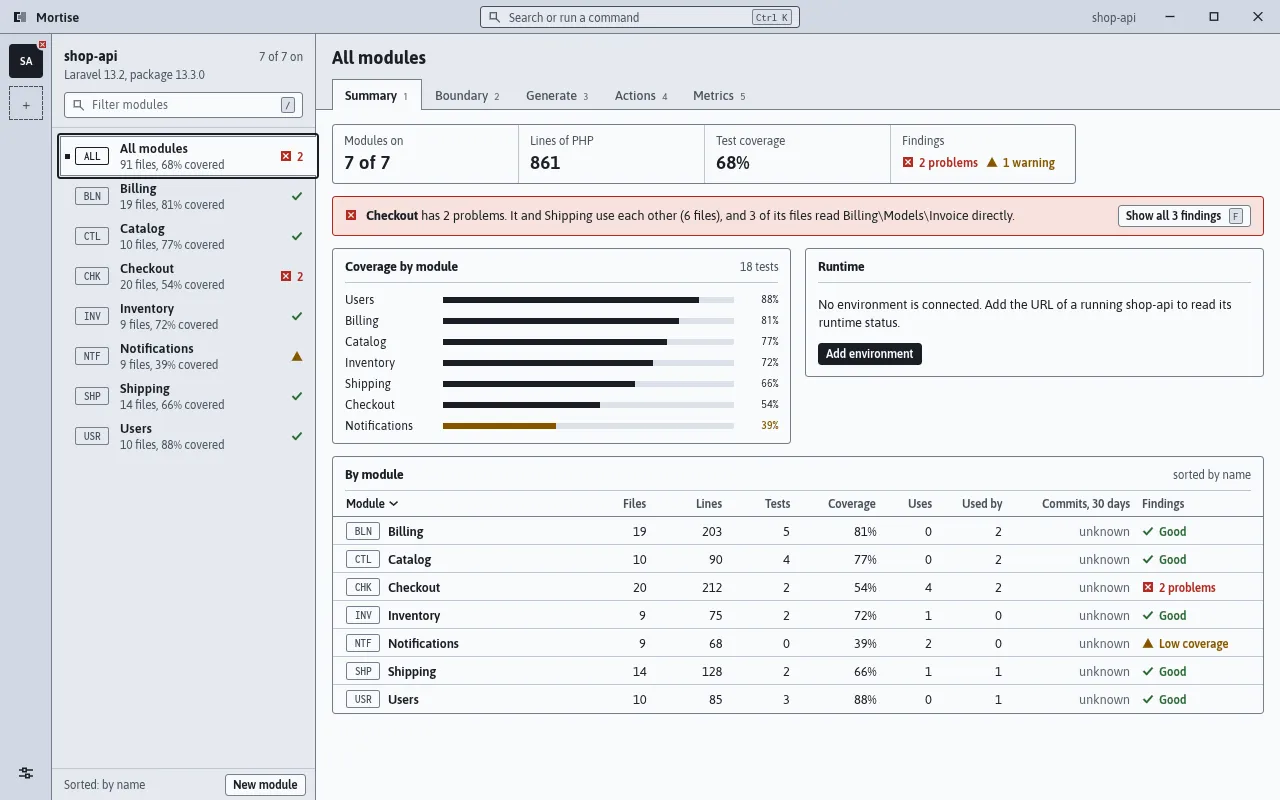
The parts, from top to bottom:
Note on config/modules.php
Section titled “Note on config/modules.php”When a setting of config/modules.php needs PHP to work out, a note says which and that
“Mortise uses the default of the package instead.”
If the folder of the modules is one of them, the note adds that the list is wrong when the modules are elsewhere.
Figures
Section titled “Figures”| Figure | Value |
|---|---|
| Modules on | “7 of 7”. Unknown when the app keeps the state of its modules outside a file |
| Lines of PHP | The lines of PHP in all modules, such as “41,212” |
| Test coverage | The coverage of the app, such as “71%”, or unknown without a report. Its tooltip names the report: “From build/coverage/clover.xml, written 2 days ago” |
| Findings | “2 problems”, “1 warning”, or Good |
| Runtime | While an environment is connected: a stroke mark, the status word and “on local” |
The module with the most problems, in bold, and what is wrong with it, in one sentence: “Checkout has 2 problems. It and Shipping use each other (6 files), and 3 of its files read Billing\Models\Invoice directly.” Without a module that has a problem, the alert shows the first finding. The alert ends with Show all 3 findings (Show the finding for one) and the key F. Both open the Findings list.
When the app keeps the state of its modules outside a file, a sentence says so: “shop-api keeps the state of its modules with the activator “…”, not in a file. Mortise reads files only, so it cannot tell which modules are on.” An app with no module says “shop-api has no modules in Modules.”
In a workspace of 720 px or more, the boxes stand in two columns: coverage and routes at the left, the runtime box at the right. In a narrower workspace they stand one under the other.
| Box | Note at the right | Content |
|---|---|---|
| Coverage by module | The number of tests, such as “307 tests” | One bar per module with a coverage figure, best first. Shown only with a coverage report |
| Routes by module (actuator) | “106 routes, read from local” | The number of routes of each module, then Not in a module. A route counts for a module when its action is a class of the module. Closures and routes of packages are not in a module |
| Runtime box (actuator) | The environment switch | See Runtime box |
| Scheduled tasks (actuator) | “5 tasks, read from local” | Columns Task, Schedule, Next run and Module. The next run reads “14:10 UTC”, “tomorrow 06:00 UTC”, a date, or “no fixed time”. A task shows the module its module tag names. Without the tag, it shows the module of its job class or the module that declares its php artisan command. A task that is in no module shows none |
| By module | “sorted by name”, or “sorted by files, highest first” | A table, below |
When the app does not expose mappings or scheduledtasks, the box keeps its title and says
“mappings is not exposed on local. Add it to exposure.include in config/actuator.php.”
By module table
Section titled “By module table”| Column | Value |
|---|---|
| Module | The code stamp and the name |
| Files | The files in the module folder. Hidden files, vendor, node_modules and what .gitignore excludes are not counted |
| Lines | The lines of its PHP files. Blade views are not PHP files |
| Tests | The tests in its test files |
| Coverage | A percent, or unknown |
| Uses | How many modules it uses |
| Used by | How many modules use it |
| Commits, 30 days | Commits that touched the module in the last 30 days |
| Findings | “2 problems”, Low coverage, Warning, Good, or Off for a module that is off |
A click on a header sorts by that column. A second click reverses the order. Names sort from A, numbers start with the highest. J and K move through the table while it has focus. Enter selects that module in the index.
Summary of one module
Section titled “Summary of one module”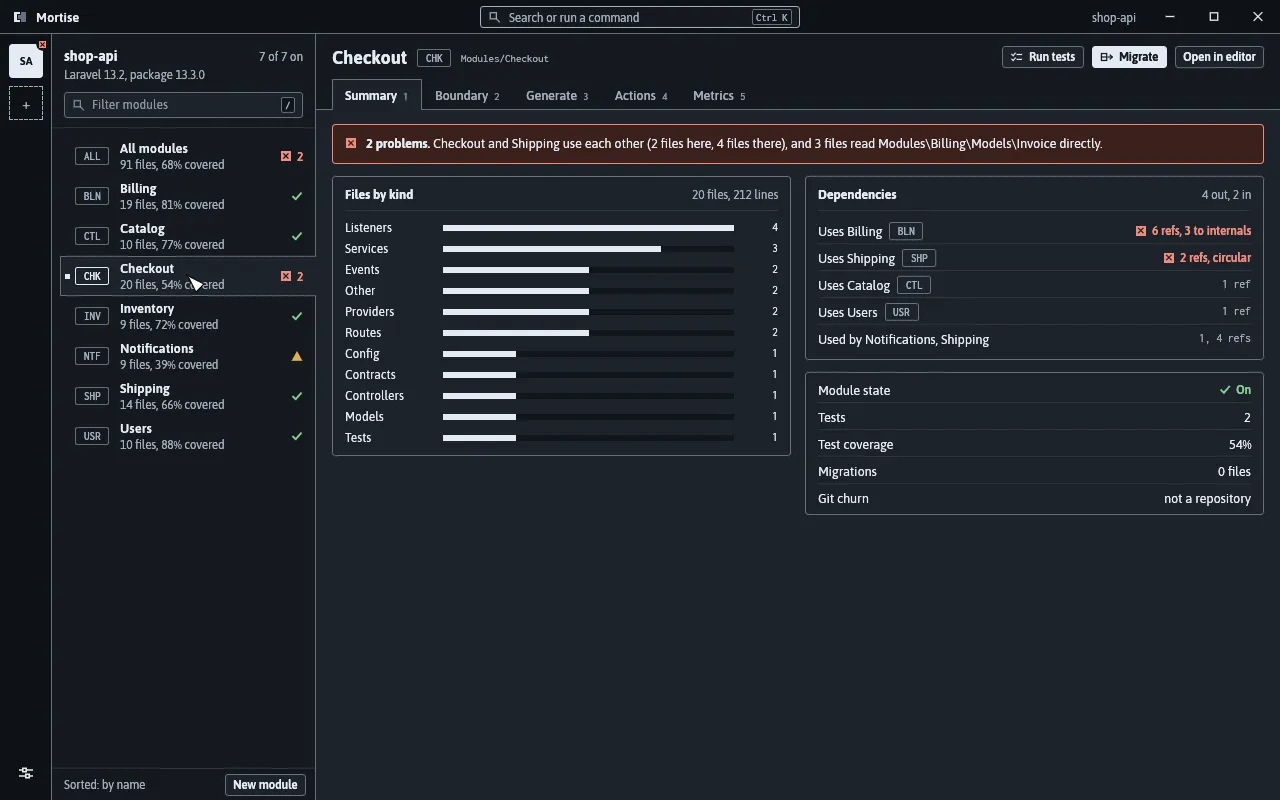
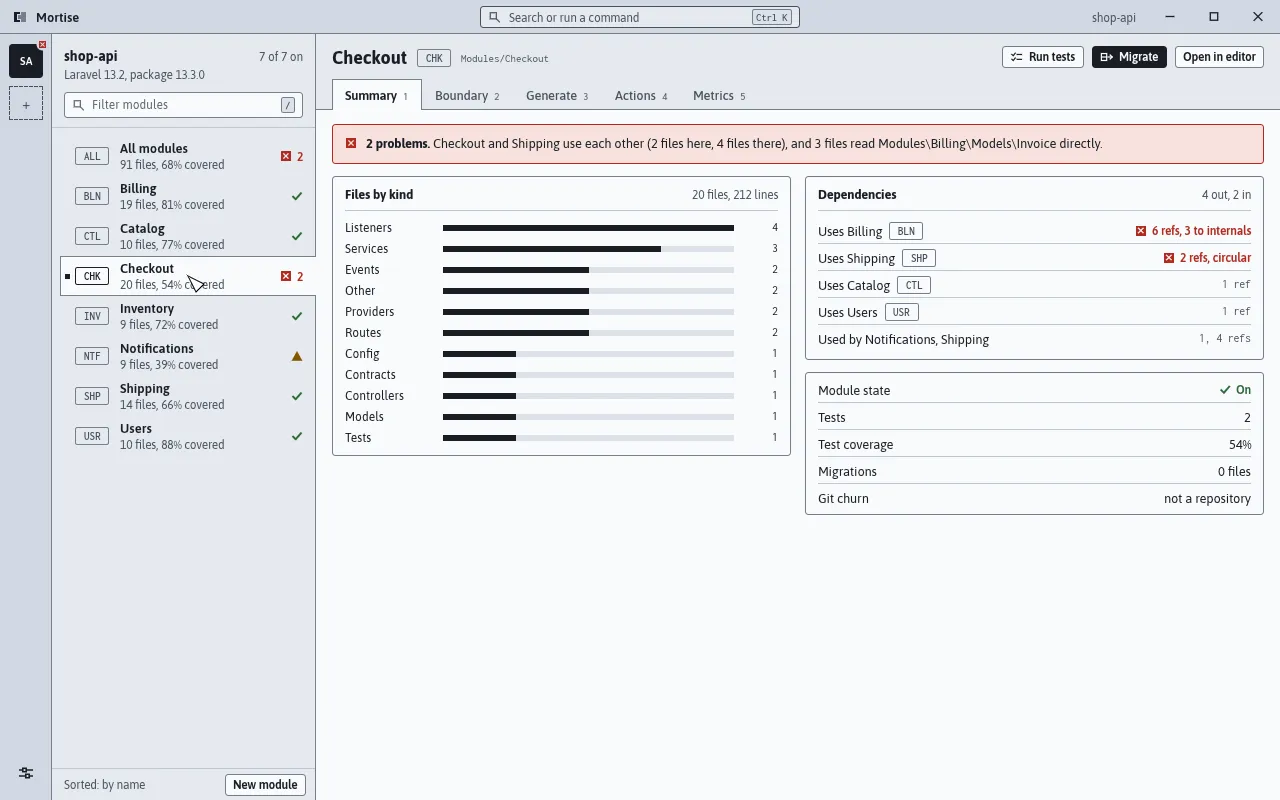
The findings of the module, in one sentence: “2 problems. Checkout and Shipping use each other (2 files here, 4 files there), and 3 files read Modules\Billing\Models\Invoice directly.” A module with warnings only shows each warning sentence.
A circle is counted on one module only. The other modules of the circle show a note: “Part of a circle counted on Checkout”.
| Box | Note at the right | Content |
|---|---|---|
| Files by kind | “84 files, 6,412 lines” | One bar per kind, by the folder a file is in: Tests, Views, Migrations, Requests, Controllers and so on |
| Dependencies | “4 out, 2 in” | One line per module it uses, such as “Uses Billing” with “6 refs, 3 to internals” or “2 refs, circular”. Then one line Used by with the names and their counts, such as “4, 2 refs” |
| State lines | none | Listed below |
| Runtime box (actuator) | The environment switch | “Status of Checkout”, then the module’s own indicators by key |
| Scheduled tasks (actuator) | “1 task” | The tasks of the module |
| Routes (actuator) | “18 routes, read from local” | Columns Method, URI, Name, Action and Middleware |
The state lines:
| Line | Value |
|---|---|
| Module state | On, Off, or Unknown when the state is not in a file |
| Tests | The tests in its test files |
| Test coverage | A percent, or unknown |
| Routes | Shown when the app exposes mappings: “18 (12 API, 6 web)”, counted by the api and web middleware |
| Migrations | “9 files” until the migration state is read, then “9 ran”. With migrations waiting: “9 ran” and a warning mark with “1 waiting” |
| Git churn | “14 commits in 30 days, last 2 days ago”, “never committed”, “not a repository” or “git was not found” |
The migration state comes from the package, through PHP. See Actions.
The runtime box of a module shows only when the last answer of the chosen environment has a status for the module. It is full width, above the scheduled tasks.


Runtime box
Section titled “Runtime box”The runtime box of All modules is titled “Runtime on local”, or Runtime before an environment is chosen. With more than one environment, a switch in its heading chooses the one to show. The same choice applies to the index header and to Metrics.
While the app answers, the box lists:
| Line | Value |
|---|---|
| Status | Up, Down, Out of service or Unknown, with “checked 8 s ago”. “asking” before the first answer |
| Components | One line per component of the app, with the detail the app gives, such as “198.6 GB free of 460.4 GB”. When all are up and there is no room, they share one line: “4 up” |
| Modules not up | One line per module that is not Up, with its status |
| Environment | The environment name and “Laravel 13.2.0” |
| Git | The branch “at” the commit |
| PHP | The version and the interface, such as “8.4.27, fpm-fcgi” |
| Memory | “38 MB now, 41 MB peak, limit 512 MB” |
A component that is out of service says so. For readinessState it adds
“The app reports this while it is in maintenance mode.”
The other states of the box:
| State | Text | Controls |
|---|---|---|
No nwidart/laravel-actuator in composer.lock |
“Runtime status needs nwidart/laravel-actuator. shop-api has no entry for it in composer.lock. Run composer require nwidart/laravel-actuator in the app.” | Copy command |
| No environment | “No environment is connected. Add the URL of a running shop-api to read its runtime status.” | Add environment |
| No answer | “Cannot reach local. No answer from …: connection refused. Start the app, or correct the URL in Settings.” | Try again, Open settings |
| Credentials refused | “local refused the credentials. … answered 401. Replace the credentials for local in Settings.” | Open settings |
| A 5xx status | “local answered 500 for /actuator/health. The actuator configuration has an error. Read the app log.” | Open settings |
| A redirect | “local answered 301 for /actuator and sends to …. Correct the base URL or the actuator path in Settings to match that address.” Mortise does not follow it | Open settings |
| Details hidden | “Components are hidden. The app shows them only when health.show_details allows it, and that is never by default. Set it to when_authorized or always in config/actuator.php.” | none |
| Endpoints not exposed | “info, mappings and scheduledtasks are not exposed on local. Only health is exposed by default. Add them to exposure.include in config/actuator.php.” and the line to add | Copy line, Try again |
How the status of a module is worked out is in About runtime per module.