
Generate tab
The Generate tab is tab 3 of the workspace. It runs the generators of nwidart/laravel-modules.
| Keys | Does |
|---|---|
| 3 | Opens the tab. Focus stays where it was. |
| G | Opens the tab with the generator filter focused. |
| Ctrl N (Cmd N on macOS) | Selects All modules and opens the new module form. |
| Ctrl Enter (Cmd Enter on macOS) | Runs the line the form shows. |
| Ctrl Shift C (Cmd Shift C on macOS) | Copies the command. |
The picker
Section titled “The picker”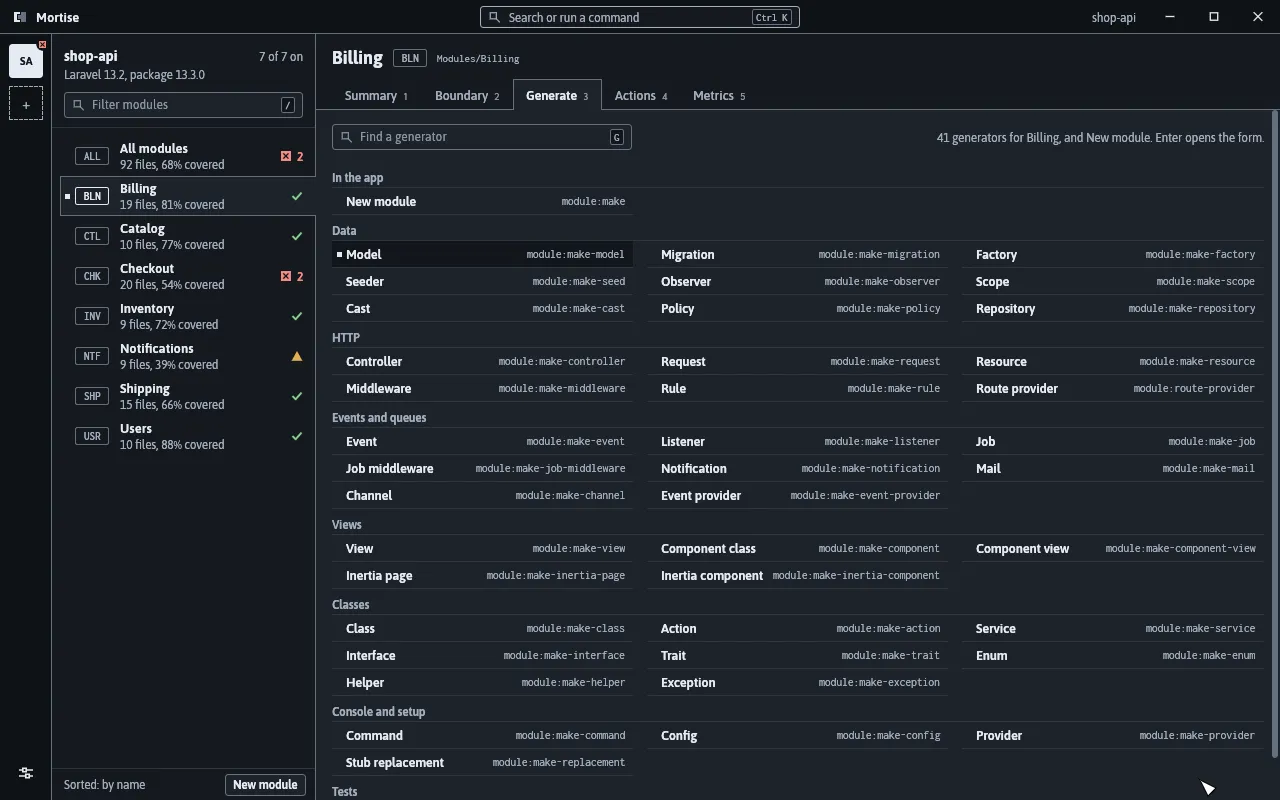
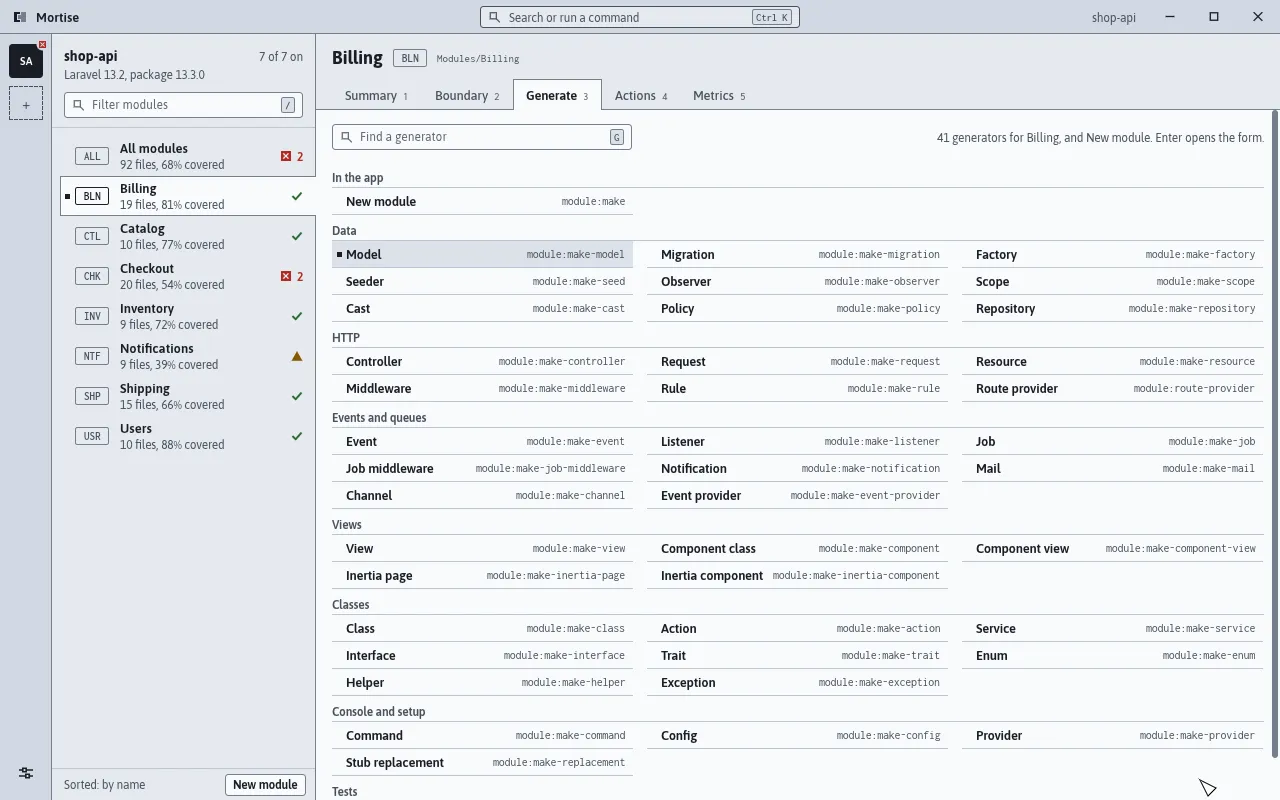
The picker lists the generators in groups, in this order: In the app, Data, HTTP, Events and queues, Views, Classes, Console and setup, Tests. A generator that Mortise does not place, such as one the app adds itself, goes to a last group, Other, sorted by name.
- With a module selected, the line under the filter reads, for example, “41 generators for Billing, and New module. Enter opens the form.”
- With All modules selected, the picker lists New module only, with the line “Select a module in the index to generate files in it.”
- Typing in Find a generator filters by label and by artisan name.
- Up, Down, Left and Right move. Enter opens the form. Esc clears the filter.
Which list the picker shows
Section titled “Which list the picker shows”Mortise reads the version of nwidart/laravel-modules from composer.lock.
| App’s package | List |
|---|---|
| Before 13.4.0, or a dev, branch or pre-release version | The 42 generators of 13.3.0, shipped with Mortise |
| 13.4.0 or later | The 43 generators of 13.4.0, shipped with Mortise, until you read the generators of the app |
| 13.4.0 or later, after a read | The generators read from the app |
The 13.4.0 list adds module:make-health-indicator to the 13.3.0 list. The options of the other
generators are the same in both lists, apart from --dry-run and --json.
When the shipped list is of another minor version than the app’s, the picker is marked, for example “for nwidart/laravel-modules 13.3”.
Read the generators of the app
Section titled “Read the generators of the app”On 13.4.0 and later the picker offers Read the generators of <app>, with its line on screen:
module:generators --no-interaction --ansi --json behind the runner prefix. Mortise reads the list
only when you press the button.
- The list read replaces the shipped one for that app. A generator of the app’s own shows under Other, with its form.
- After a read the picker says, for example, “Read from shop-api at 14:05.” beside Read again.
- The list is kept in Mortise’s data folder, under
catalogs/, for that app and that package version. A new package version makes it stale. See Files and folders. - A read that gives no list says: “Mortise could not read the generators of
<app>: “<reason>”. The list is the one shipped for 13.4.”
The generators
Section titled “The generators”Each form is built from the package’s description of the generator. The module argument is filled from the selection. An option with a value is a text field. A flag is a checkbox under Options. Both are labelled with the package’s own description, without its full stop, with the option beside it.
--force is on no form except the new module form. Replace is the way to write over a file.
--dry-run and --json are on no form: Mortise adds them itself.
The table lists the 43 generators of 13.4.0, by group. “Class name” and “no spaces” are the name checks.
In the app
Section titled “In the app”| Generator | Command | What it makes | Fields and options |
|---|---|---|---|
| New module | module:make |
Create a new module. | See New module. |
| Generator | Command | What it makes | Fields and options |
|---|---|---|---|
| Model | module:make-model |
Create a new model for the specified module. | See Model. |
| Migration | module:make-migration |
Create a new migration for the specified module. | Migration name (class name) The specified fields table ( --fields=)Create plain migration ( --plain) |
| Factory | module:make-factory |
Create a new model factory for the specified module. | Factory name (class name) |
| Seeder | module:make-seed |
Create a new seeder for the specified module. | Seeder name (class name) Indicates the seeder will created is a master database seeder ( --master) |
| Observer | module:make-observer |
Create a new observer for the specified module. | Observer name (class name) |
| Scope | module:make-scope |
Create a new scope class for the specified module. | Scope name (class name) |
| Cast | module:make-cast |
Create a new Eloquent cast class for the specified module. | Cast name (class name) |
| Policy | module:make-policy |
Create a new policy class for the specified module. | Policy name (class name) |
| Repository | module:make-repository |
Create a new repository class for the specified module. | Repository name (class name) Generate an invokable repository class ( --invokable) |
| Generator | Command | What it makes | Fields and options |
|---|---|---|---|
| Controller | module:make-controller |
Generate new restful controller for the specified module. | Controller name (class name) Generate a plain controller ( --plain)Exclude the create and edit methods from the controller ( --api)Generate a single method, invokable controller class ( --invokable)Generate an Inertia controller ( --inertia) |
| Request | module:make-request |
Create a new form request class for the specified module. | Request name (class name) |
| Resource | module:make-resource |
Create a new resource class for the specified module. | Resource name (class name) Create a resource collection ( --collection)Create a JSON:API resource ( --json-api) |
| Middleware | module:make-middleware |
Create a new middleware class for the specified module. | Middleware name (class name) Generate an Inertia HandleInertiaRequests middleware ( --inertia) |
| Rule | module:make-rule |
Create a new validation rule for the specified module. | Rule name (class name) Generate an implicit rule ( --implicit) |
| Route provider | module:route-provider |
Create a new route service provider for the specified module. | No field. The module comes from the selection. |
Events and queues
Section titled “Events and queues”| Generator | Command | What it makes | Fields and options |
|---|---|---|---|
| Event | module:make-event |
Create a new event class for the specified module. | Event name (class name) |
| Listener | module:make-listener |
Create a new event listener class for the specified module. | Listener name (class name) The event class being listened for ( --event=)Indicates the event listener should be queued ( --queued) |
| Job | module:make-job |
Create a new job class for the specified module. | Job name (class name) Indicates that job should be synchronous ( --sync) |
| Job middleware | module:make-job-middleware |
Create a new job middleware class for the specified module. | Job middleware name (class name) |
| Notification | module:make-notification |
Create a new notification class for the specified module. | Notification name (class name) |
module:make-mail |
Create a new email class for the specified module. | Mail name (class name) | |
| Channel | module:make-channel |
Create a new channel class for the specified module. | Channel name (class name) |
| Event provider | module:make-event-provider |
Create a new event service provider class for the specified module. | No field. The module comes from the selection. |
| Generator | Command | What it makes | Fields and options |
|---|---|---|---|
| View | module:make-view |
Create a new view for the specified module. | View name (no spaces) |
| Component class | module:make-component |
Create a new component-class for the specified module. | Component class name (class name) |
| Component view | module:make-component-view |
Create a new component-view for the specified module. | Component view name (no spaces) |
| Inertia page | module:make-inertia-page |
Create a new Inertia page for the specified module. | Inertia page name (no spaces) Create a Vue component (default) ( --vue)Create a React component ( --react)Create a Svelte component ( --svelte) |
| Inertia component | module:make-inertia-component |
Create a new Inertia component for the specified module. | Inertia component name (no spaces) Create a Vue component (default) ( --vue)Create a React component ( --react)Create a Svelte component ( --svelte) |
Classes
Section titled “Classes”| Generator | Command | What it makes | Fields and options |
|---|---|---|---|
| Class | module:make-class |
Create a new class. | Class name (class name) The type of class, e.g. class, service, repository, contract, etc ( --type=)Append the type to the class name (for example FooService) ( --suffix)Generate a single method, invokable class ( --invokable) |
| Health indicator | module:make-health-indicator |
Create a new nwidart/laravel-actuator health indicator for the specified module. Not in 13.3. | Health indicator name (class name) |
| Action | module:make-action |
Create a new action class for the specified module. | Action name (class name) Generate an invokable action class ( --invokable) |
| Service | module:make-service |
Create a new service class for the specified module. | Service name (class name) Generate an invokable service class ( --invokable) |
| Interface | module:make-interface |
Create a new interface class for the specified module. | Interface name (class name) |
| Trait | module:make-trait |
Create a new trait class for the specified module. | Trait name (class name) |
| Enum | module:make-enum |
Create a new enum class for the specified module. | Enum name (class name) |
| Helper | module:make-helper |
Create a new helper class for the specified module. | Helper name (class name) Generate an invokable class ( --invokable) |
| Exception | module:make-exception |
Create a new exception class for the specified module. | Exception name (class name) Create the exception with an empty render method ( --render)Create the exception with an empty report method ( --report) |
Console and setup
Section titled “Console and setup”| Generator | Command | What it makes | Fields and options |
|---|---|---|---|
| Command | module:make-command |
Generate new Artisan command for the specified module. | Command name (class name) The terminal command that should be assigned ( --command=) |
| Config | module:make-config |
Create a new configuration file for the specified module. | Config name (no spaces) |
| Provider | module:make-provider |
Create a new service provider class for the specified module. | Provider name (class name) Indicates the master service provider ( --master) |
| Stub replacement | module:make-replacement |
Create a new replacement key command class for stubs. | Stub replacement name (class name) |
| Generator | Command | What it makes | Fields and options |
|---|---|---|---|
| Test | module:make-test |
Create a new test class for the specified module. | Test name (class name) Create a feature test ( --feature) |
The model form
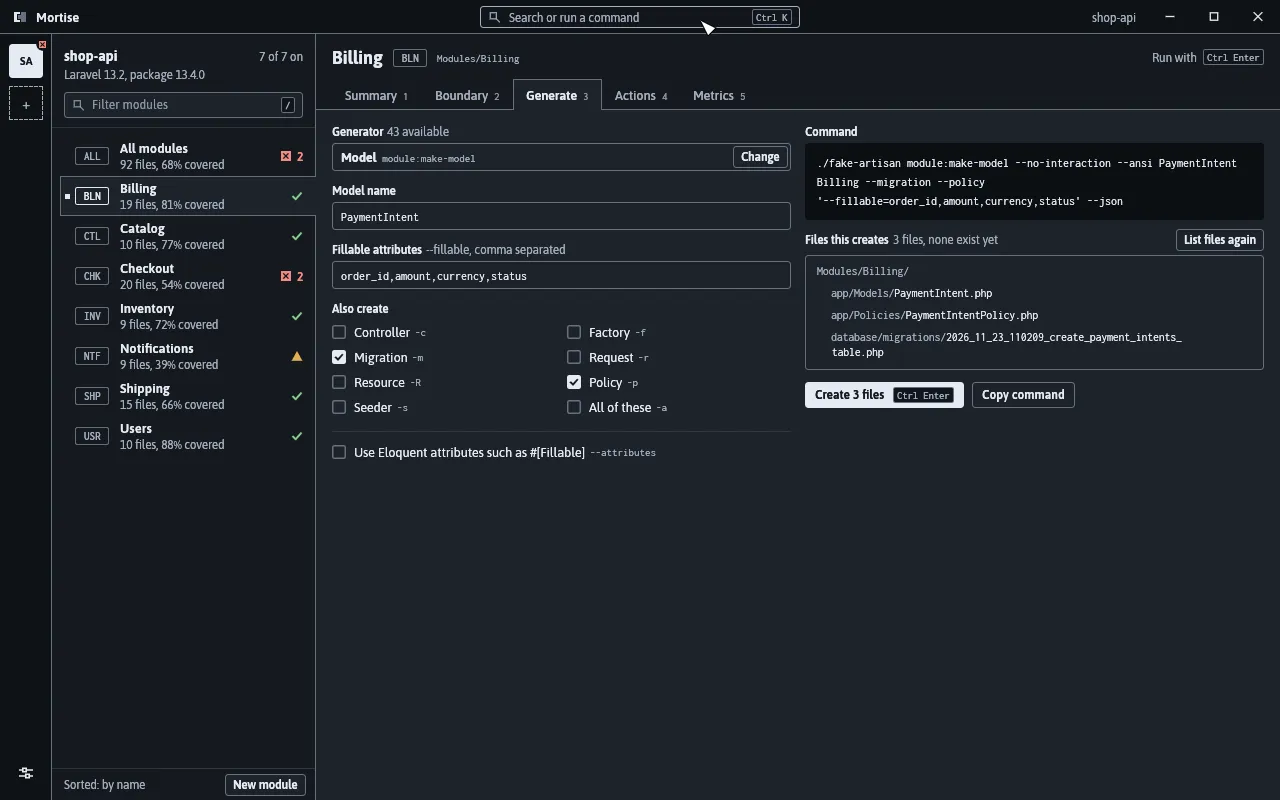
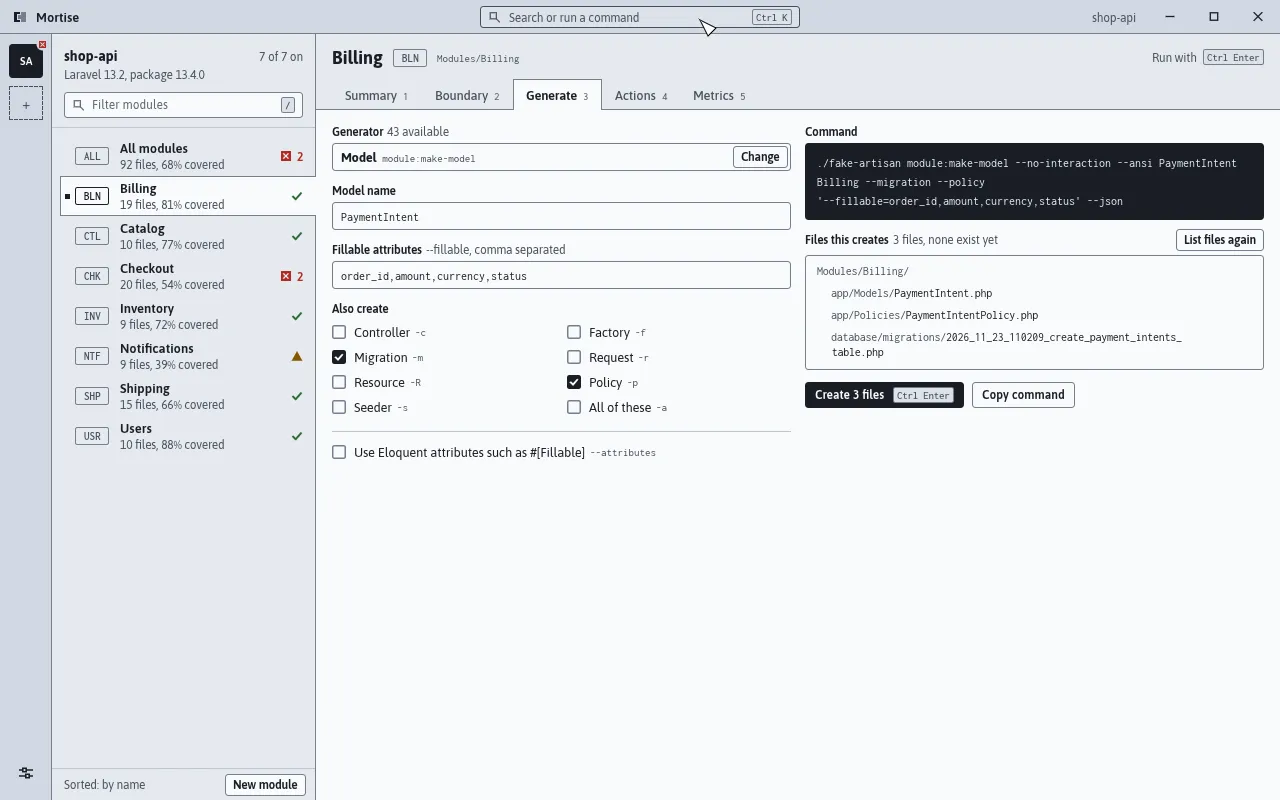
Section titled “The model form”The form of module:make-model has its own fields.
| Field | Word |
|---|---|
| Model name | The model argument, checked as a class name |
Fillable attributes (--fillable, comma separated) |
--fillable=<value> |
| Also create: Controller, Factory, Migration, Request, Resource, Policy, Seeder | --controller, --factory, --migration, --request, --resource, --policy, --seed |
| All of these | --all, in place of the seven flags. Checking it checks the seven boxes |
| Use Eloquent attributes such as #[Fillable] | --attributes |
Checking all seven boxes also gives --all.
The new module form
Section titled “The new module form”New module in the index footer, in the picker, in the palette, and Ctrl N
open this form. The form selects All modules. Its title is “New module in <app>”.
| Field | Word |
|---|---|
| Module names (one or more, separated by spaces) | One word per name, each checked as a module name |
Kind (--web is the default): Web, API, Plain |
Web adds no flag. API adds --api. Plain adds --plain |
| Inertia controller and pages, no Blade views | --inertia |
| Turn the module on after creation (unchecked adds –disabled) | Unchecked adds --disabled |
| Replace the module if it exists | --force. The run then asks first |
| Author (optional, written to composer.json): Name, Email, Vendor | --author-name=, --author-email=, --author-vendor= |
The button reads Create module. Before 13.4 the form also says “Then the command runs composer dump-autoload in the app.”
Name checks
Section titled “Name checks”While a name fails, the error shows under its field and the run button is off. An empty name turns the button off without an error.
| Rule | Generators | Passes |
|---|---|---|
| Class name | Every generator not listed below | One or more parts split on / or \. Each part starts with an ASCII letter, then ASCII letters, digits or _. create_posts_table passes |
| No spaces | View, Component view, Config, Inertia page, Inertia component | No white space, and no - at the start |
| Module name | New module | An ASCII letter, then ASCII letters, digits, - or _ |
Examples of the errors:
- “A model name starts with a letter and has no spaces. Write PaymentIntent, not “payment intent”.”
- “The module name [2fa] is not valid. Use letters, digits, “-”, “_” or spaces, starting with a letter.”
The command line
Section titled “The command line”The line under Command is the line the run button starts, rebuilt on every change. It holds the
runner prefix and --no-interaction --ansi, quoted for the shell of the platform.
- Each value is one word, such as
--fillable=order_id,amount,currency,status. No shell reads it. - When an argument starts with
-, the arguments go last, after--. - The run button and Ctrl Enter run only a line that was whole on screen. While it was not, the button is off with the tooltip “Scroll up to see the whole command first.”
- Without a runner, while a name fails, or while a command runs in the app, the button is off.
On 13.4.0 and later, a run of a generator the package ships also carries --json. Mortise reads
the result from that answer.
List files
Section titled “List files”How the form shows the files depends on the package version.
| App’s package | Under the command | Button |
|---|---|---|
| Before 13.4.0, or a generator of the app’s own | “The files are listed after the run.” | Create files, or Create module |
| 13.4.0 or later | List files, with the line of the dry run on screen | Create <n> files after a list |
List files runs the generator with --dry-run --json. The dry run creates and changes no file.
It runs only when you press the button, never on a keystroke.
- After the dry run, the form lists the files under Files this creates, by folder. The head counts them: “3 files, none exist yet” or “3 files, 1 exists already”.
- The button counts them: Create 3 files.
- Any change of the command drops the list. List files again beside the head asks for a fresh answer.
- A dry run that gives no list says: “The dry run gave no file list: “
<reason>”.”
A file that exists
Section titled “A file that exists”A generator does not write over a file. When the dry run reports that a file exists:
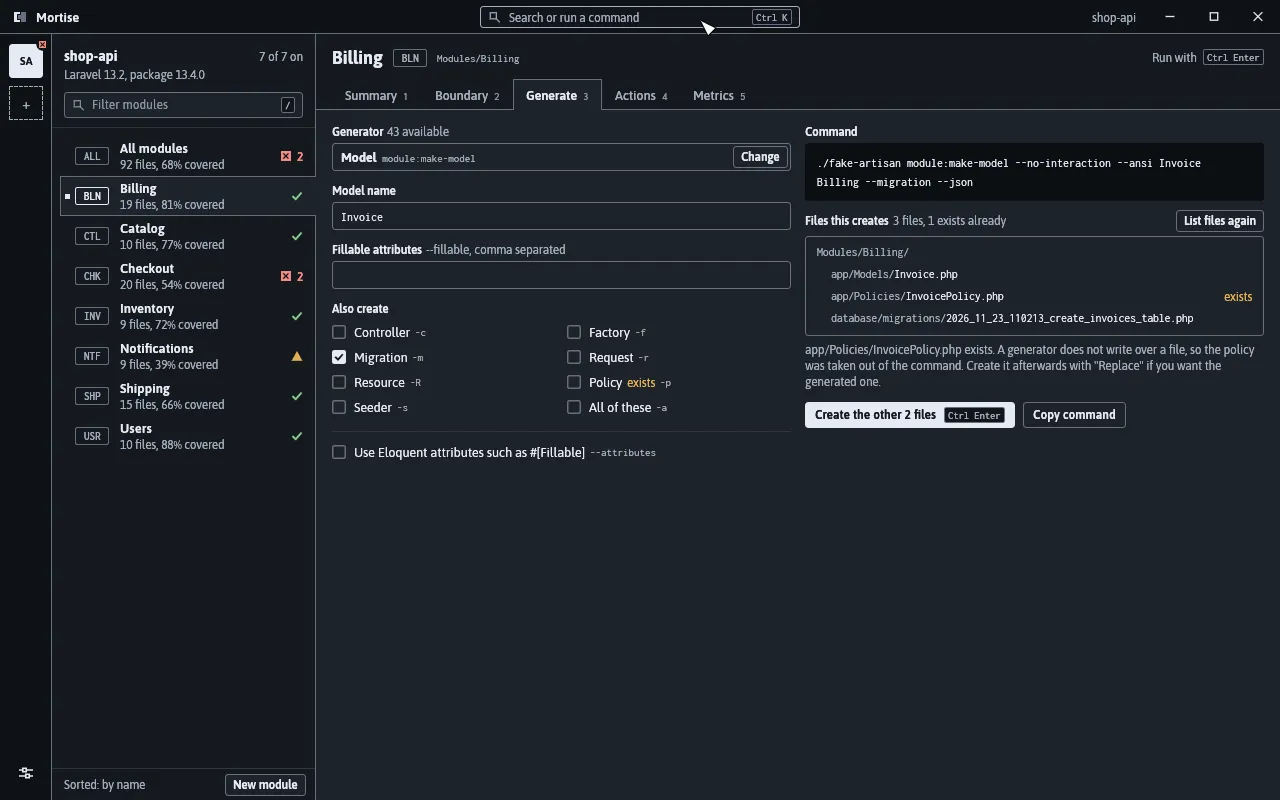
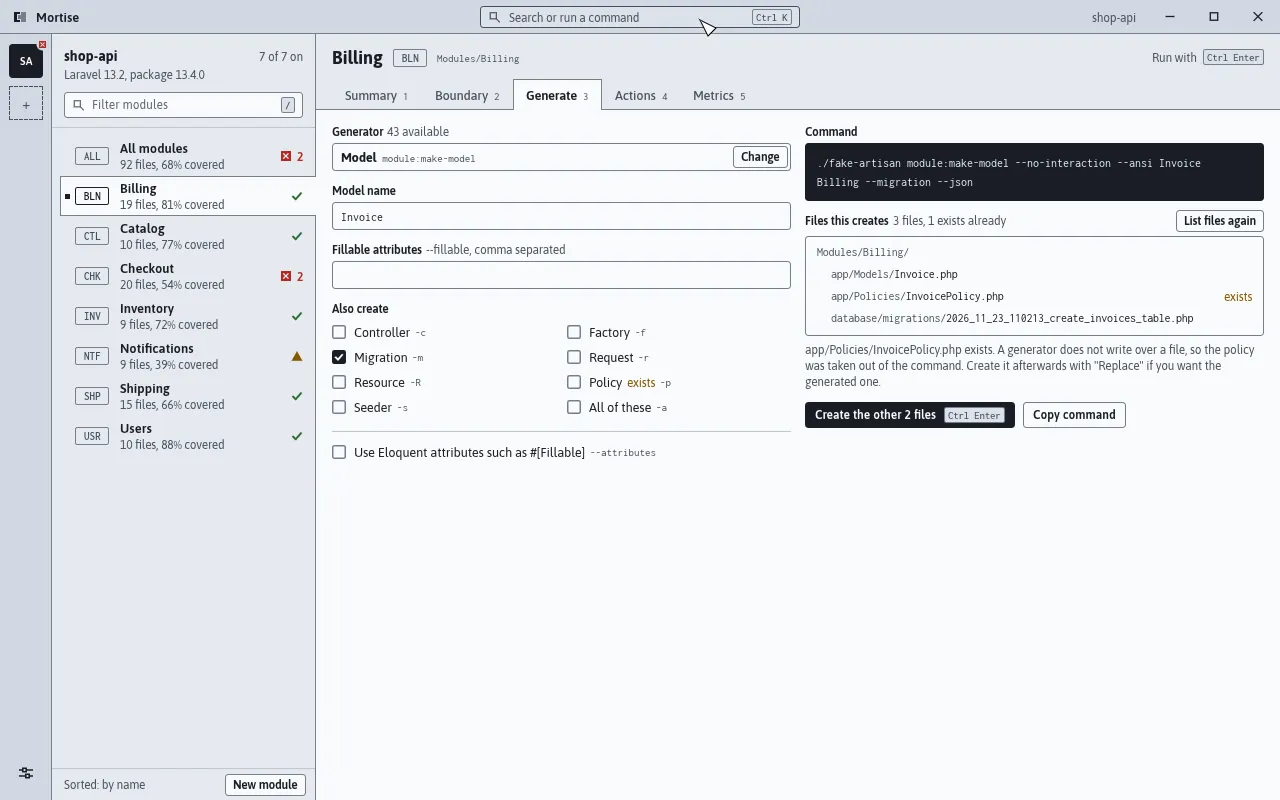
- On the model form, the flag of that file is unchecked and marked exists, and it leaves the line.
The button reads, for example, Create the other 2 files. The factory is the exception: the
model uses its factory, so
--factorystays and the run leaves the file as it is. - When the generator’s own file exists, the form says to choose another name, or to replace the file.
The result of a run
Section titled “The result of a run”When a run ends, the form keeps its values and shows the files:
| Row | Means |
|---|---|
| (no mark) | Created |
| replaced | Written again with --force |
| exists, left as it is | The file was there and the run left it |
| not written | The output names the file as not written, for another reason |
Each file that exists has Open. The head reads, for example, “Created in Billing” or “Created 2 of 3 files”. Generate another goes back to the form with the name cleared and the rest kept.
- A run that created every file shows the toast “Created 3 files in Billing.”
- A run that left a file shows an alert, such as “Created 2 of 3 files in Billing. InvoicePolicy.php already exists and was left as it is.”, with Open the existing file.
- The result never comes from the exit code.
- On 13.4.0 and later, the files come from the package’s JSON answer. When that answer is missing or
cannot be read, they come from the output lines, and the result says
“Read from the output: the package’s answer was “
<reason>”.”
Replace
Section titled “Replace”Replace a file
Section titled “Replace a file”When Mortise knows the generator that writes a left file, the result offers Replace <file>.
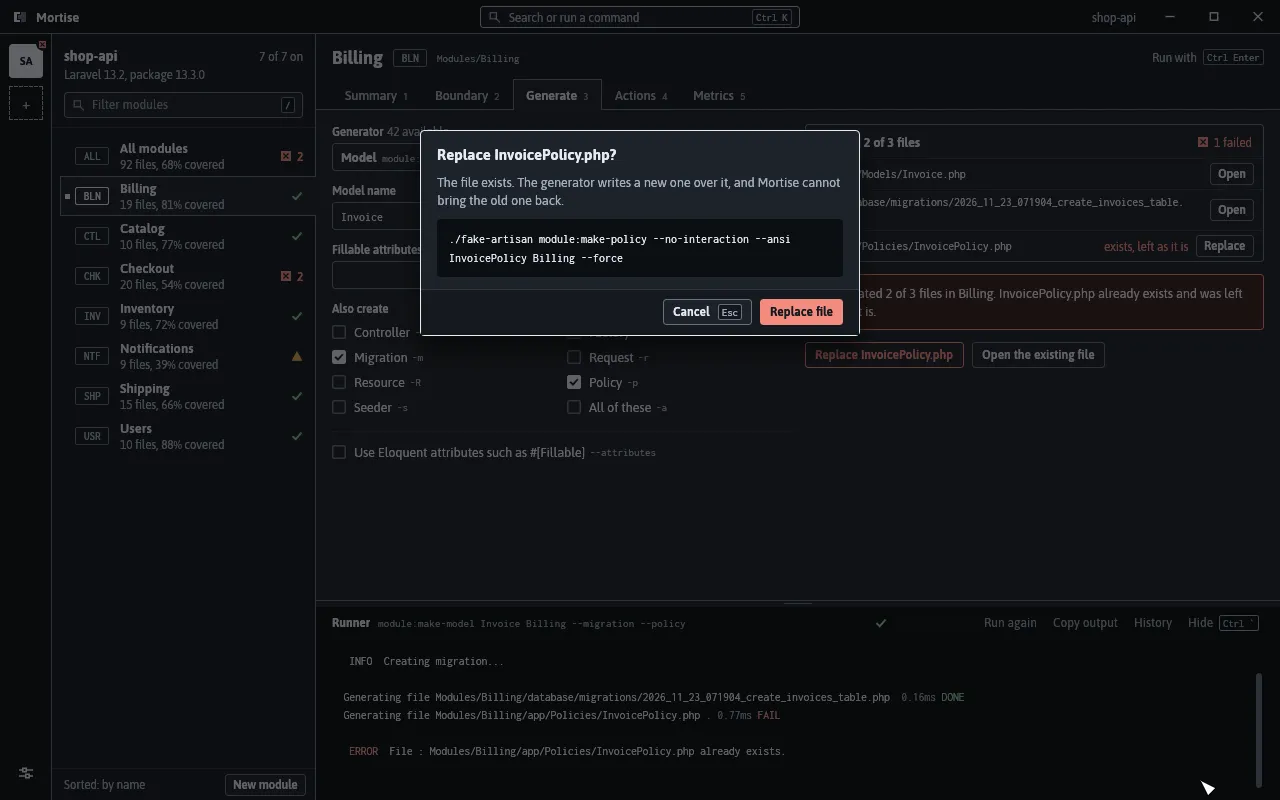
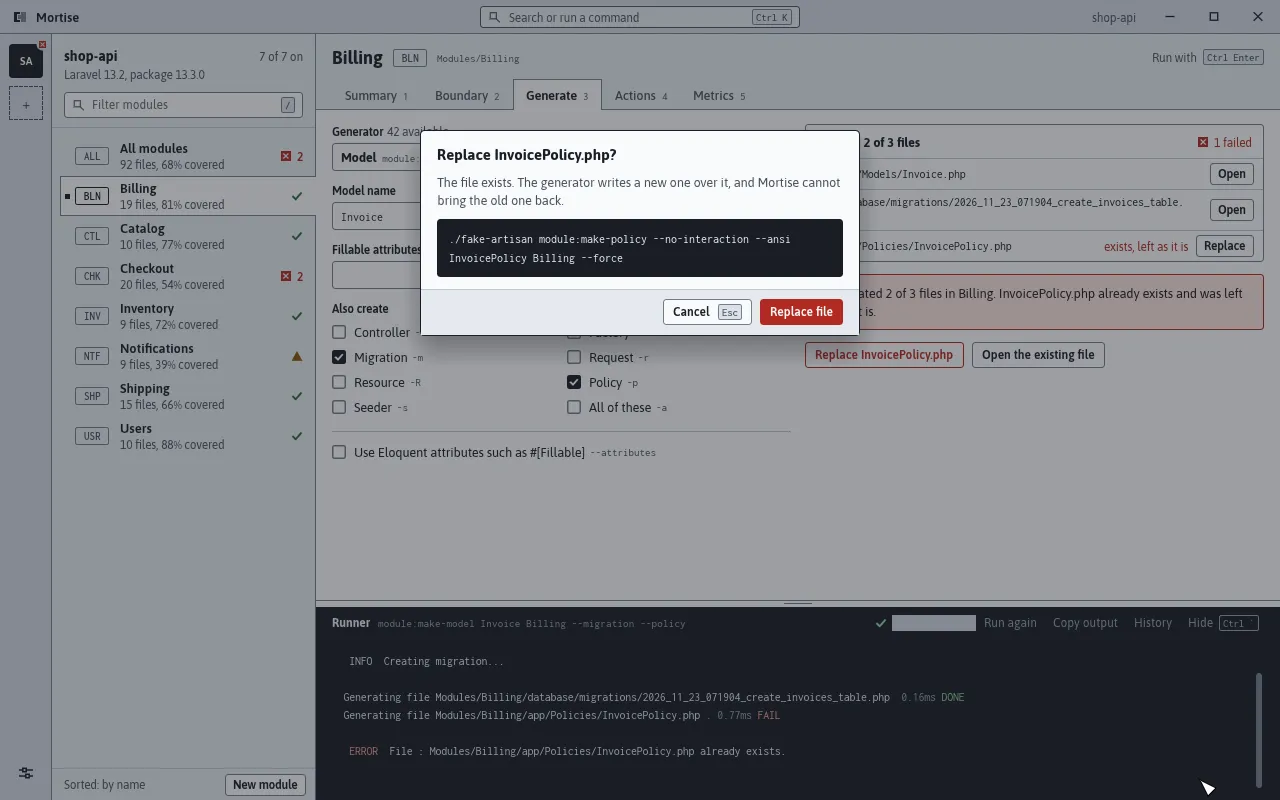
The dialog “Replace <file>?” says: “The file exists. The generator writes a new one over it, and
Mortise cannot bring the old one back.” It shows the line it runs. Focus starts on Cancel.
Only Replace file runs the generator again with --force, for example
module:make-policy InvoicePolicy Billing --force.
Replace a module
Section titled “Replace a module”With Replace the module if it exists checked, the run asks first. The dialog
“Replace the module <Module>?” shows the line and says, for example:
“Modules/Loyalty exists with 23 files. module:make –force deletes the folder, then generates the
module again. Files you wrote in it are lost.” Nothing runs until Replace module.