
Runner drawer
The runner drawer sits at the bottom of the workspace. It shows the command that runs, or ran last, in the app on screen, with its output as the command writes it.
How a command runs
Section titled “How a command runs”- Mortise starts a command only when you start it, with its line on screen first.
- The command runs through the runner of the app: Herd, Sail, Docker or a Custom line. See Settings.
- Mortise adds
--no-interaction --ansiafter the first artisan word. It does not add a flag that the line already holds. - The command never goes through a shell. The process gets a program and a list of arguments.
- Standard input is closed. A command that asks a question reads the end of its input and goes on without waiting for you.
- One command runs at a time in an app. A second start in that app is refused with the name of the command that runs. Runs in different apps do not block each other.
Showing and hiding
Section titled “Showing and hiding”The drawer opens when a command starts. It stays until you hide it.
| Keys | Does |
|---|---|
| Ctrl `, on macOS too | Shows or hides the drawer |
| Ctrl J (Cmd J on macOS) | Shows or hides the drawer |
On macOS Cmd </kbd> cycles the windows, so the drawer keeps <kbd>Ctrl</kbd> <kbd> there.
- Hidden, the drawer is one line of 28 px with Show. Shown, its bar has Hide.
- Until the drawer is first shown, it takes no room.
- With no run in the app, it reads “No command has run yet. Output of generators and actions appears here.”
Height
Section titled “Height”The top edge of the drawer is a handle, named “Height of the runner drawer”.
- Drag it to set the height between 120 px and half the height of the workspace. The default is 200 px.
- With focus on the handle, Up and Down change the height by 24 px. Home and End jump to the highest and the lowest.
- A double click collapses the drawer.
What the drawer shows
Section titled “What the drawer shows”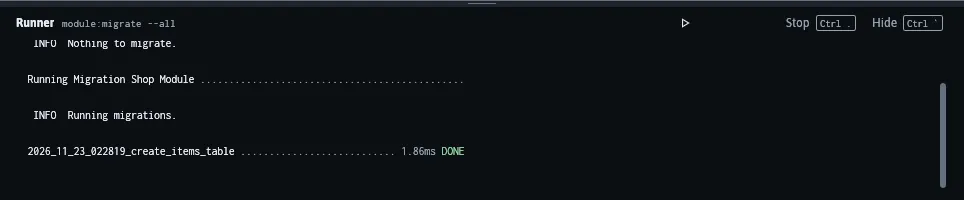
- The
$line: the exact command line, quoted for the shell of the platform. - The output of standard output and standard error, line by line, as it arrives.
- Colours of the output map to four styles: text, dim, success and error. Other escape sequences are removed.
- The status of the run, on the bar.
A run keeps at most 1 MB of output. Output past that is read and dropped, so the command never blocks. The drawer then says “Output past 1 MB is not kept.”
States
Section titled “States”| State | Status on the bar | Example |
|---|---|---|
| Running | Running, and the time with one decimal | Running, 2.4 s |
| Done | Done in, and the time | Done in 186 ms |
| Failed | The exit code, and the time | Exit code 1, 412 ms |
| Ended by a signal | Ended by a signal | |
| Stopped | Stopped after, and the time | Stopped after 3.1 s |
| Stopped at the time limit | Stopped, with a line that names the limit | Stopped at the time limit of 10 minutes. |
| Did not start | The command did not start, with the reason | The command did not start: “herd: command not found”. Choose how PHP runs for shop-api in Settings. |
A time under a second is written in ms, else in seconds with one decimal.
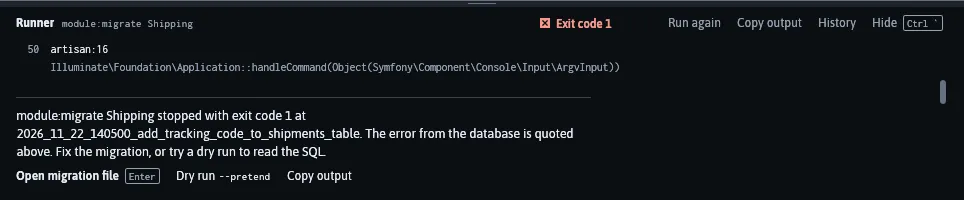
A failure ends with one sentence from Mortise under a rule:
- A
module:migraterun whose output marks a migration as failed names it: “module:migrate Checkout stopped with exit code 1 at<migration>. The error from the database is quoted above. Fix the migration, or try a dry run to read the SQL.” The steps are Open migration file, Dry run and Copy output. Dry run opens the Migrate panel with the dry run checked. It does not run. - A run the app prohibits says: “The app prohibits this command, so the package refused to run it. Its message is quoted above.”
- A command that did not start offers Open settings, which opens how PHP runs for the app.
Buttons and keys of the bar
Section titled “Buttons and keys of the bar”| Button | Keys | Does |
|---|---|---|
| Stop | Ctrl . (Cmd . on macOS) | Stops the running command |
| Run again | Ctrl Shift R | Runs the last command again through the current runner of the app |
| History | Ctrl Shift H | Shows the history of runs |
| Copy output | Ctrl Shift O | Copies the output |
On macOS, Cmd takes the place of Ctrl in these keys.
While a command runs in an app, every control that starts a command in that app is off, with the
tooltip “<command> is running”.
Run again asks first before a line that Mortise asked about the first time. The dialog
“Run <command> again?” says “Mortise asked before this command ran last time. It runs the same line
again.” A destructive command opens its full dialog instead. See Actions tab.
Stop ends the command and every process it started.
- For
module:migrate,module:migrate-rollback,module:migrate-refresh,module:migrate-reset,module:migrate-freshandmodule:seed, Mortise asks first. The dialog “Stop<command>?” says “A migration that stops half way can leave the database between two states.” Its buttons are Keep running and Stop command. - Through Sail or Docker, the stop reaches the
dockerprogram only. The drawer says “PHP in the container may still run.”
How a stop ends the process tree:
| Platform | Stop |
|---|---|
| macOS, Linux | SIGTERM to the process group. SIGKILL 3 s later to what is left of the group |
| Windows | taskkill /PID <pid> /T /F on the program Mortise started, which ends its tree |
Time limit
Section titled “Time limit”Each app has a time limit, set in Settings under Stop a command after. The default is 10 minutes. The field takes 1 to 120 minutes.
A run that goes past the limit is stopped as Stop does. It ends as stopped, with the line
“Stopped at the time limit of <n> minutes.” The limit is there so that a command that waits for
input cannot hang.
History
Section titled “History”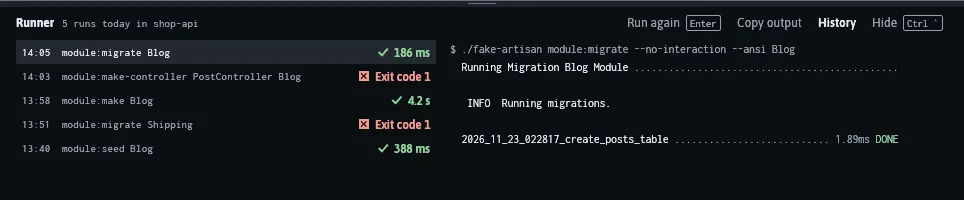
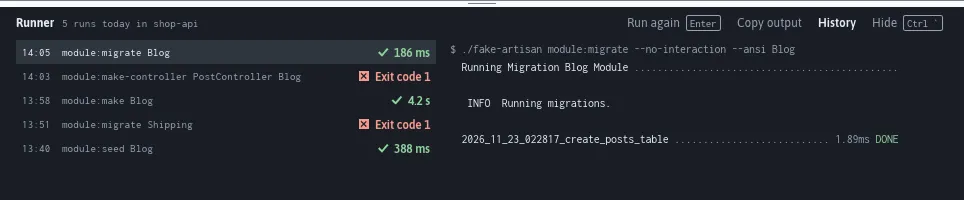
History lists the runs of the app, the latest first. Each row has its clock time, its command and its result. The output of the selected run shows beside the list.
- Up and Down move the selection.
- Enter runs the selected command again through the current runner of the app.
- The bar says, for example, “5 runs today in shop-api”.
Mortise keeps the last 50 runs of each app: the command, the start time, how the run ended and its output up to 1 MB. The 51st run drops the oldest. The history lives in Mortise’s data folder, never in the app. A history that is missing or not valid reads as empty. See Files and folders.
A read that only gives data, such as the migration state or the list of generators, is not kept in the history.
Closing Mortise
Section titled “Closing Mortise”Closing Mortise stops the run of each app as Stop does. It waits until each run ends, for at most 4.75 s: 3 s until SIGKILL, 1.25 s for the readers of the output, and 0.5 s for checks. Each run that ends this way is kept in the history as stopped. With no run, Mortise closes at once.
On Windows, the PHP child of a launcher that already exited goes on after Mortise closes (S53).